Troubleshooting
Solutions for common issues. If your problem isn't listed here, use Send Feedback in the app's sidebar or contact support, and mention the version shown at the bottom of the sidebar.
Windows Blocks the Installer
The beta is not code-signed yet, so Microsoft Defender SmartScreen shows Windows protected your PC with an Unknown publisher line. Click More info, then Run anyway. "Unknown publisher" means the file carries no certificate, not that anything is wrong with it — verify the SHA-256 checksum on the download page if you want to be sure you have the right file.
FileMind Shows an Error Screen at Startup
If the background service fails to start, FileMind replaces the app with an error screen that has
an Open logs button and a path to report the problem. The logs live in
%APPDATA%\FileMind\logs. Attach the latest file when you report the issue; note that
logs contain the paths of your PDFs.
Ask Says a Language Model Is Required
- Check the header badge: AI Ready means a model is connected; LLM unavailable means it isn't
- Open Settings → LLM Provider and click Test Connection
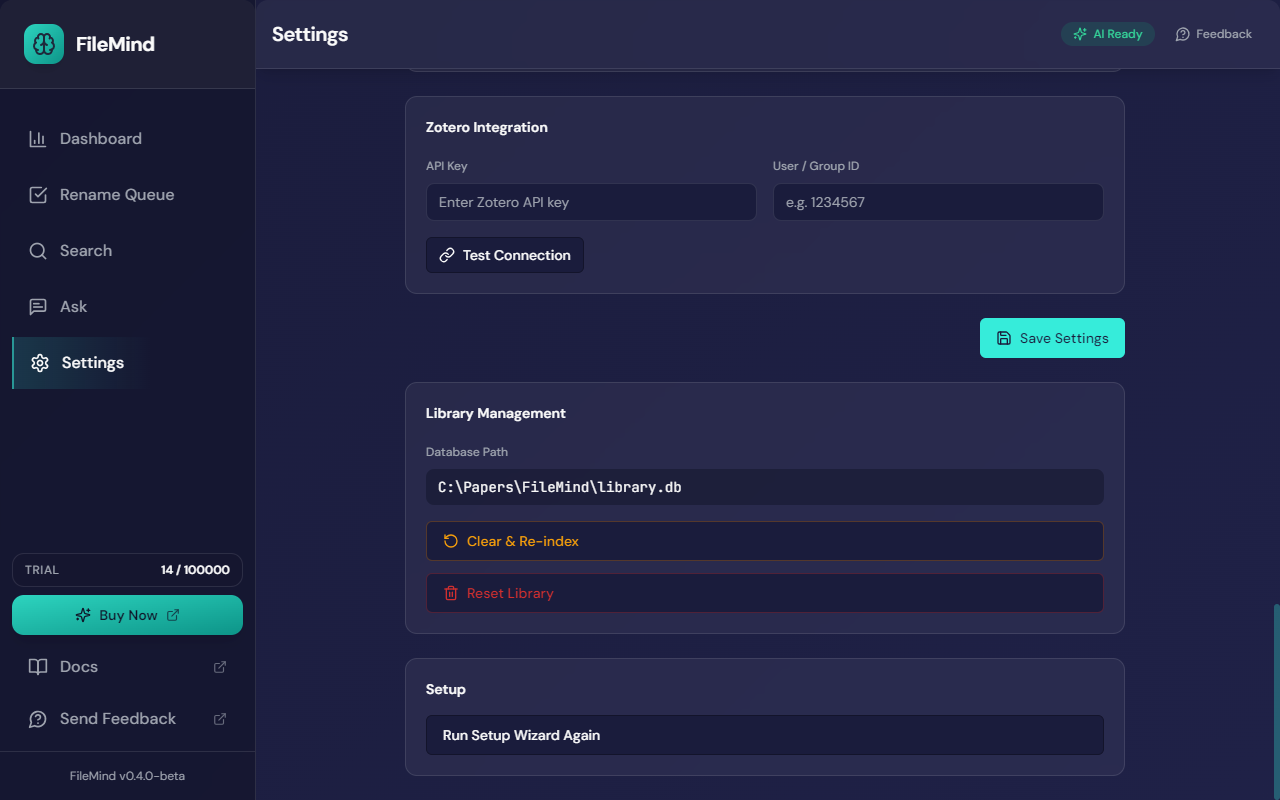
- If you use the built-in model, the card should read Running. If not, click Retry, or re-run the wizard from Settings → Setup → Run Setup Wizard Again
The Built-in Model Will Not Start
The wizard says This computer may not be able to run the built-in model when the bundled
server cannot load it — usually too little free RAM, or a CPU without the instruction sets the
server needs. Pick another provider card. Gemini's free tier needs no hardware and no card;
Ollama's llama3.2 is the lightest local option.
Ollama Not Connecting
- Verify Ollama is running: open a terminal and run
ollama serve - Check the port: FileMind expects Ollama at
http://localhost:11434 - If you changed the default port, update Base URL under Settings → LLM Provider (or
[llm] base_urlin the config) - Make sure the model named in Settings is actually installed —
ollama listshows what is. Pull it from the catalog in Settings, or runollama pull <model>
Ask Returns Nothing With a Reasoning Model
Models such as gemma4 and qwen3 can "think" before answering. With
thinking on they spend the whole answer budget reasoning and FileMind never receives the
answer. Set Thinking mode to Auto (the default) or Off under
Settings → LLM Provider.
OCR Not Working
FileMind bundles PaddleOCR and runs it locally for scanned PDFs, so no install is needed. If OCR results are poor:
- Check that scanned pages have reasonable resolution (300 DPI or better)
- Try enabling GPU acceleration: set
[ocr] paddleocr_use_gpu = true - For non-English documents, change the language:
[ocr] paddleocr_lang = "fr" - Use the File status filter on the Search screen to find files marked Failed or OCR only
Slow Processing
Processing speed depends on your hardware and library size:
- OCR for scanned PDFs is far slower than native text extraction. A large scanned archive can take a minute or more per file.
- Embedding generation is the next most expensive step. A GPU speeds it up considerably.
- Language-model operations (metadata fallback, Ask) depend on your model and hardware. A smaller model such as
llama3.2or the built-in 4B model is faster; larger ones give better answers. - Adjust
[jobs] max_concurrentto process more files in parallel (default: 2). - Leave
[ingestion] llm_text_repairoff (the default). It sends a model request per page and slows scans dramatically.
Metadata Extraction Issues
- Wrong title or author — expand the proposal in the Rename Queue to see why that name was chosen, and reject it. The paper's detail page shows the full extracted metadata.
- No metadata found — the paper may be a scanned image with poor OCR quality. Check the index status on the detail page or the File status filter.
- DOI not detected — some papers only carry the DOI in later pages. FileMind reads the first 2 pages by default; increase
[ingestion] metadata_pagesif needed. - An "OpenAlex lookups used up" notice in the header — OpenAlex's free daily allowance ran out. Nothing is lost: files scanned until it resets use local extraction plus Crossref and arXiv, and lookups resume automatically. OpenAlex is off by default for exactly this reason.
Cloud AI Calls Stopped
If you set a Monthly spend limit under Settings → AI Usage & Spend Limit, cloud calls stop for the rest of the month once the estimate reaches it. Raise or clear the limit to continue. Local models are never affected.
Search Returns No Results
- Check that your library has been fully indexed (look for pending scan jobs on the Dashboard)
- For semantic search, embeddings must be generated first — this happens automatically during scanning
- Try Exact mode if semantic search returns nothing — the query may be too abstract
- Check the
[search] semantic_min_scorethreshold — lowering it returns more results
Database Issues
- Database locked — another instance of FileMind may be running. Close it and try again. FileMind automatically retries locked operations.
- Index out of date or corrupt — use Settings → Library Management → Clear & Re-index. It deletes chunks, embeddings, proposals, and metadata but keeps your file registry; re-scan to rebuild. Your PDFs are never touched.
- Start over — Reset Library on the same card removes everything — files, metadata, proposals — so you can set the library up again from scratch.
- Large database — the SQLite file grows with your library. Embeddings are the largest component. A 1,000-paper library typically uses a few hundred megabytes.
Health Check
FileMind's health endpoint reports the status of every subsystem. The service listens on a
random local port chosen at startup and recorded in the service log under
%APPDATA%\FileMind\logs. The health route needs no token:
GET http://127.0.0.1:{port}/api/v1/health{
"ok": true,
"degraded": ["llm"],
"llm": {
"available": false,
"reason": "Ollama not reachable"
}
}FileMind degrades gracefully — if the language model is unavailable, heuristic metadata extraction, search, and exports still work. If embeddings are unavailable, exact search still works.