Configuration
FileMind stores its configuration in a TOML file. All settings have sensible defaults — most users won't need to change anything beyond what the setup wizard and the Settings screen configure. This page lists every setting with its default.
Config File Location
| Platform | Path |
|---|---|
| Windows | %APPDATA%\FileMind\config.toml |
| macOS (when it ships) | ~/Library/Application Support/FileMind/config.toml |
The library database, logs, and the built-in model live alongside it under
%APPDATA%\FileMind. The command-line tool also accepts --config and
--db to point at other locations.
API keys and other secrets pasted into Settings are stored encrypted (Windows DPAPI). A plaintext value typed into the file by hand is still accepted and is encrypted on the next save from the app.
Environment Variable Overrides
Any setting can be overridden with an environment variable using the FILEMIND_
prefix and double underscores for nesting:
FILEMIND_LLM__PROVIDER=anthropic
FILEMIND_LLM__ANTHROPIC_API_KEY=sk-ant-...
FILEMIND_RENAME__AUTO_APPROVE_THRESHOLD=0.8
Database
[db]
path = ""  # Empty = the platform app-data directory above
PDF Ingestion
[ingestion]
metadata_pages = 2                   # Pages to read for metadata (1-10)
text_quality_min_chars = 400         # Min chars for good text quality (50-5000)
text_quality_min_alpha = 0.55        # Min alphabetic character ratio (0.1-0.95)
text_quality_max_replacement = 0.01  # Max replacement-character ratio
llm_text_repair = false              # Ask the LLM to repair badly joined words (slow; off by default)
OCR
[ocr]
provider = "paddleocr"           # "paddleocr" (bundled), "null", or "external"
render_dpi = 300                 # Page render DPI for OCR (72-600)
paddleocr_lang = "en"            # Language code
paddleocr_use_gpu = false        # Enable GPU acceleration
paddleocr_use_angle_cls = false  # Enable angle classification
paddleocr_preprocess = true      # Enable image preprocessing
Embeddings
[embeddings]
provider = "sentence-transformers"
model = "BAAI/bge-small-en-v1.5"  # Bundled with the app; no download needed
dims = 384                        # Must match model output dimensions
batch_size = 32                   # Chunks per embedding batch
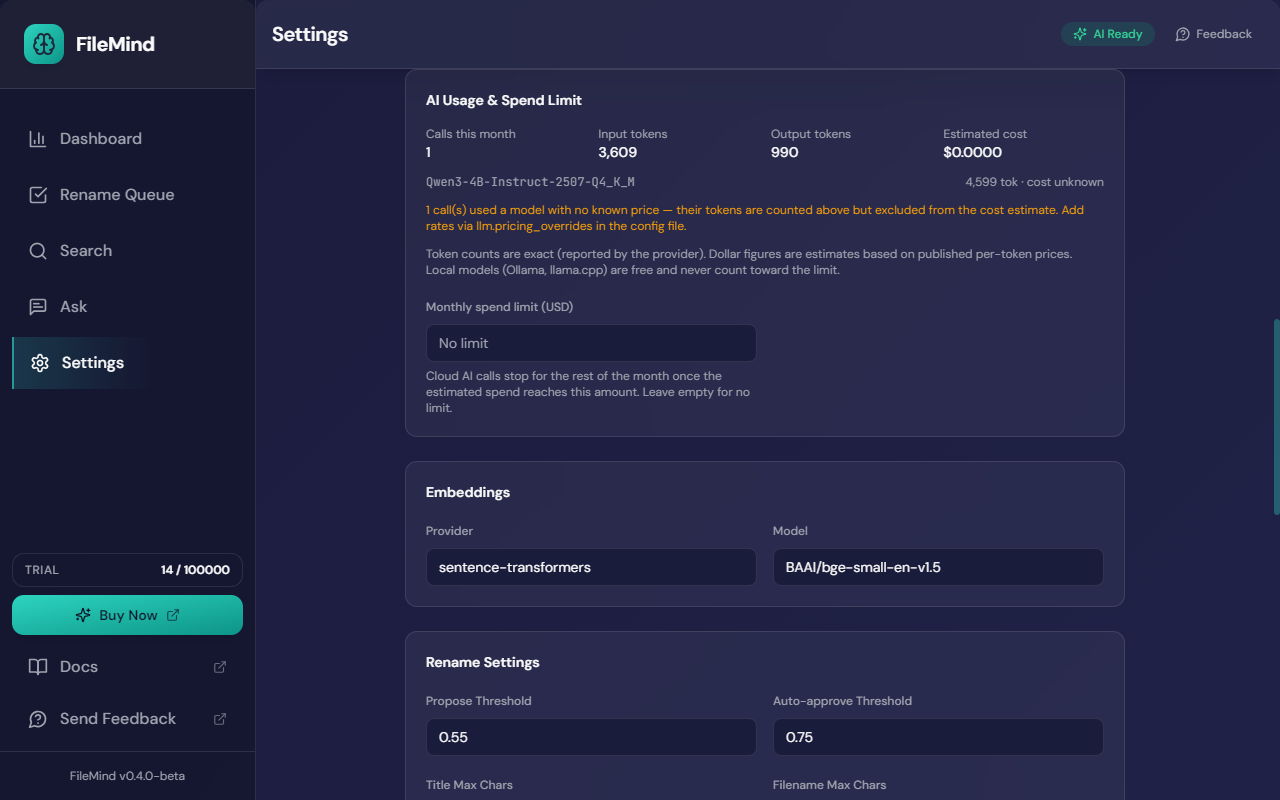
Libraries created with the earlier all-MiniLM-L6-v2 model are migrated
automatically: the old value is dropped from the file and the next scan re-embeds the library.
Language Model
For end-to-end setup of each provider, see the Model Providers guide. The Setup Wizard and Settings → LLM Provider write this section for you.
[llm]
provider = "ollama"      # "ollama", "llamacpp", "openai", "anthropic", "gemini"
model = "llama3.2"       # Model name or id for the provider
base_url = ""            # API base URL override (Ollama, LM Studio, custom servers)
api_key = ""             # OpenAI or custom-server key
anthropic_api_key = ""   # Claude key
gemini_api_key = ""      # Gemini key
temperature = 0.1        # Sampling temperature (0.0-2.0)
max_retries = 2          # Retry count when the model's answer fails validation
timeout_seconds = 120    # Per-request timeout (5-600)
context_window = 0       # Tokens; 0 = autodetect from the provider
think = "auto"           # Ollama thinking mode: "auto", "on", "off"
vision_rescue = false    # Send page 1 as an image to an Ollama vision model when extraction fails
vision_model = ""        # e.g. "llama3.2-vision"
spend_limit_usd = 0.0    # Monthly cap on estimated cloud spend; 0 = no limit
Cloud providers use the provider-specific key fields:
[llm]
provider = "anthropic"
model = "claude-sonnet-5"
anthropic_api_key = "sk-ant-..."

# Or for OpenAI:
provider = "openai"
model = "gpt-5.4"
api_key = "sk-..."

# Or for Gemini:
provider = "gemini"
model = "gemini-3.7-flash"
gemini_api_key = "AIza..."

# Or an OpenAI-compatible local server (LM Studio, llama.cpp, vLLM):
provider = "llamacpp"
base_url = "http://localhost:1234/v1"
model = "your-model-id"
The built-in model is a llamacpp entry that FileMind manages itself,
pointing at the bundled server on 127.0.0.1. It also sets a managed = true
flag so that the app knows to start and stop that server. Leave that flag alone; a server you
point FileMind at yourself must not carry it.
Local models are always free, and spend_limit_usd can never block them.
The ollama, llamacpp and null providers are priced at zero
rather than left unpriced — so the built-in model, LM Studio, and any custom OpenAI-compatible
server you run yourself contribute nothing to the monthly total no matter how much you use them.
The cap applies only to the cloud providers it can actually price.
Per-token prices for the spend estimate come from a bundled table. Override or add rates with
pricing_overrides, in USD per million tokens:
[llm.pricing_overrides."gpt-5.4"]
input = 2.5
output = 15.0
Bibliographic Lookup
[openalex]
enabled = true                # Master switch for ALL lookups, Crossref included
skip_openalex = true          # Skip OpenAlex only; Crossref and arXiv still run (default)
enable_arxiv = true           # Ask arXiv's API first for arXiv-anchored papers
api_key = ""                  # Optional funded OpenAlex key
mailto = ""                   # Contact email sent with Crossref/OpenAlex requests
timeout_seconds = 10          # API timeout (1-60)
title_match_threshold = 0.85  # Minimum title-match confidence (0.5-1.0)
Crossref and arXiv are free and unmetered, so they run by default. OpenAlex meters anonymous use
with a small daily budget that a first scan of a few hundred papers exhausts, and its wrong
years were the main cause of confidently wrong proposals — so it is skipped by default. Set
skip_openalex = false to opt back in, ideally with a funded key. When the OpenAlex
budget does run out mid-scan, the app shows a notice in the header and carries on with
Crossref and arXiv.
Rename Settings
[rename]
template = "default"           # Template style
title_max_chars = 50           # Max title portion in filename (20-200)
filename_max_chars = 160       # Max total filename length (60-255)
auto_approve_threshold = 0.75  # "High" tier — eligible for Approve High
propose_threshold = 0.55       # "Medium" tier — below this is "Needs review"
The auto_approve_threshold must be greater than propose_threshold. Both
are editable under Settings → Rename Settings.
Search & Ask
[search]
default_mode = "hybrid"           # "hybrid", "fts", or "semantic"
default_limit = 40                # Default results per query
semantic_min_score = 0.15         # Minimum embedding similarity
rag_top_k = 12                    # Passages retrieved for Ask before context sizing
rag_min_score = 0.3               # Minimum passage score for Ask
reranker_enabled = true           # Cross-encoder reranking of search and Ask results
reranker_model = "cross-encoder/ms-marco-MiniLM-L-6-v2"
rag_auto_context = true           # Fit as many passages as the model's window allows
rag_context_utilization = 0.6     # Share of the context window to spend on passages (0.1-0.95)
rag_max_context_tokens = 16384    # Ceiling on passage tokens even for huge windows
rag_top_k_max = 48                # Never retrieve more than this many passages
Zotero
[zotero]
enabled = false
api_key = ""
user_id = ""
library_type = "user"      # "user" or "group"
default_collection = ""
timeout_seconds = 10
See Export & Integration for the walkthrough.
Background Jobs
[jobs]
max_concurrent = 2      # Max parallel jobs (1-8)
scan_batch_size = 50    # Files per scan batch
embed_batch_size = 32   # Chunks per embedding batch
Service
[service]
host = "127.0.0.1"   # Always localhost for security
port = 0             # 0 = auto-select a free port
workers = 1          # Uvicorn workers
log_level = "info"   # "debug", "info", "warning", "error"
License
[license]
trial_pdf_limit = 100   # PDFs indexable on the free trial (beta builds lift this)
Beta builds start the service with FILEMIND_LICENSE__TRIAL_PDF_LIMIT raised so the
trial is effectively unlimited. See Licensing.