Licensing
FileMind offers a free trial and two paid plans. All features are available in the trial — the only limit is the number of PDFs.
License Types
| Plan | Price | PDFs | Machines |
|---|---|---|---|
| Trial | Free | Unlimited during beta | Unlimited |
| Pro | $39 one-time | Unlimited | 2 |
| Lab | $139 one-time | Unlimited | Up to 5 seats |
Where to Find It in the App
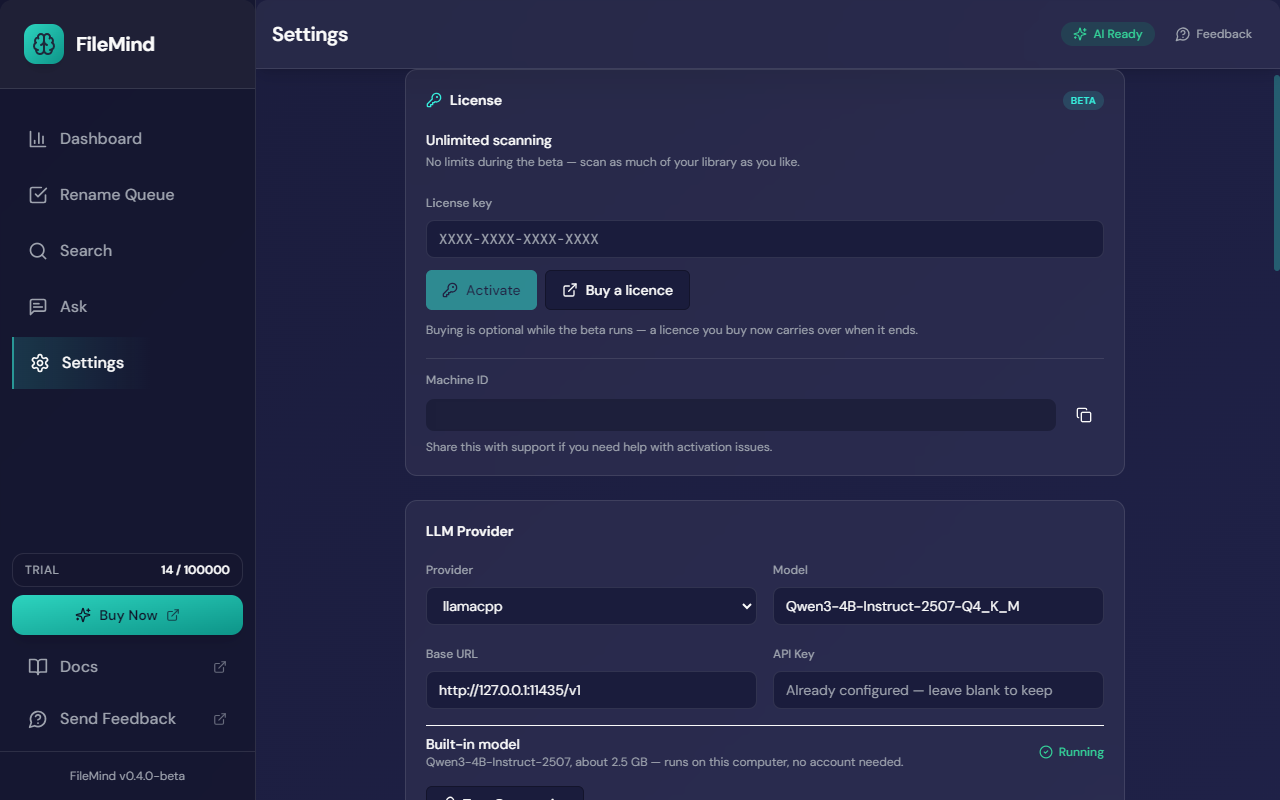
The License card sits at the top of Settings. It shows your current plan, the license-key field, and a Machine ID to quote to support if an activation ever needs untangling. The sidebar shows a running count of indexed PDFs against your allowance and a Buy Now button while you are on the trial.
Activating Your License
- Purchase a license from the pricing page — Buy a licence in the app opens the same page
- Check your email for the license key
- In FileMind, open Settings → License
- Paste the key and click Activate
Transferring to a New Machine
- On the old machine: open Settings → License and click Deactivate
- On the new machine: enter the same license key and activate
Pro licenses allow 2 concurrent activations. Lab licenses allow up to 5. Deactivating on one machine frees a seat immediately.
Trial Limitations
The trial includes all features with no time limit. The only restriction is a maximum of 100 PDFs in your library. Once you reach the limit, you can still search and ask questions about your existing papers — you just can't add new ones until you upgrade.
During the public beta this cap is lifted. Beta builds ship with no PDF limit, so you can point FileMind at your entire library. The 100 PDF cap described above takes effect with the general release.
License Recovery
Lost your license key? Check your email for the original purchase confirmation, or contact support with the email address you used to purchase. Include the Machine ID from the License card if the problem is an activation that will not release.